🔒 Touch Review is in closed testing until the end of 2026. There's no public release yet. Want your studio in? Get in touch →
Code review for game dev

Review the whole change, not just the code

A change in a game is rarely only code. It's a Blueprint, a material, a model and a texture, all in one changelist. Touch Review opens every one of them in the browser, shows exactly what changed, and lets you comment on the node, the pixel or the vertex. One review and one approval, for programmers and artists alike.

1 review
for a .cpp file and a .uasset alike, with one approval at the end
1:1
Blueprint and material graphs drawn the way the Unreal editor draws them
6 / 4
views to compare a 3D model and a texture
0 downloads
nobody has to sync a file and open the editor just to look at a change
See it working

One changelist, start to finish

A real review of a small feature: a lantern that flickers. Code, a Blueprint, a material, a model and a texture, reviewed in under two minutes without leaving the browser.

  1. C++ header. A comment on one line, marked as a suggestion.
  2. Blueprint. Click a change and both sides jump to the node.
  3. Material. The new node with its texture preview, as in the editor.
  4. Model and texture. What moved, and which pixels changed.
  5. Approve. Every file ticked off, one vote for the whole change.
Why

Art goes in without review because looking at it costs too much

Code review tools show a changed .uasset as “binary file, 9.5 MB”. To see what an artist actually did, a reviewer has to sync the change, open the editor, find the asset and compare it with what they remember from last week. So most teams simply don't. Touch Review does the comparison for you, in the same place where the code is reviewed.

Blueprints

See the node that changed, not a binary blob

Both versions of the graph sit side by side and move together: pan or zoom one and the other follows. The list of changes on the right says what happened in plain words. Click one and both sides centre on that node.

  • Every graph in the Blueprint: event graph, functions, macros, plus variables, components and class defaults.
  • Comment on a node. The comment sticks to the node, not to a line number.
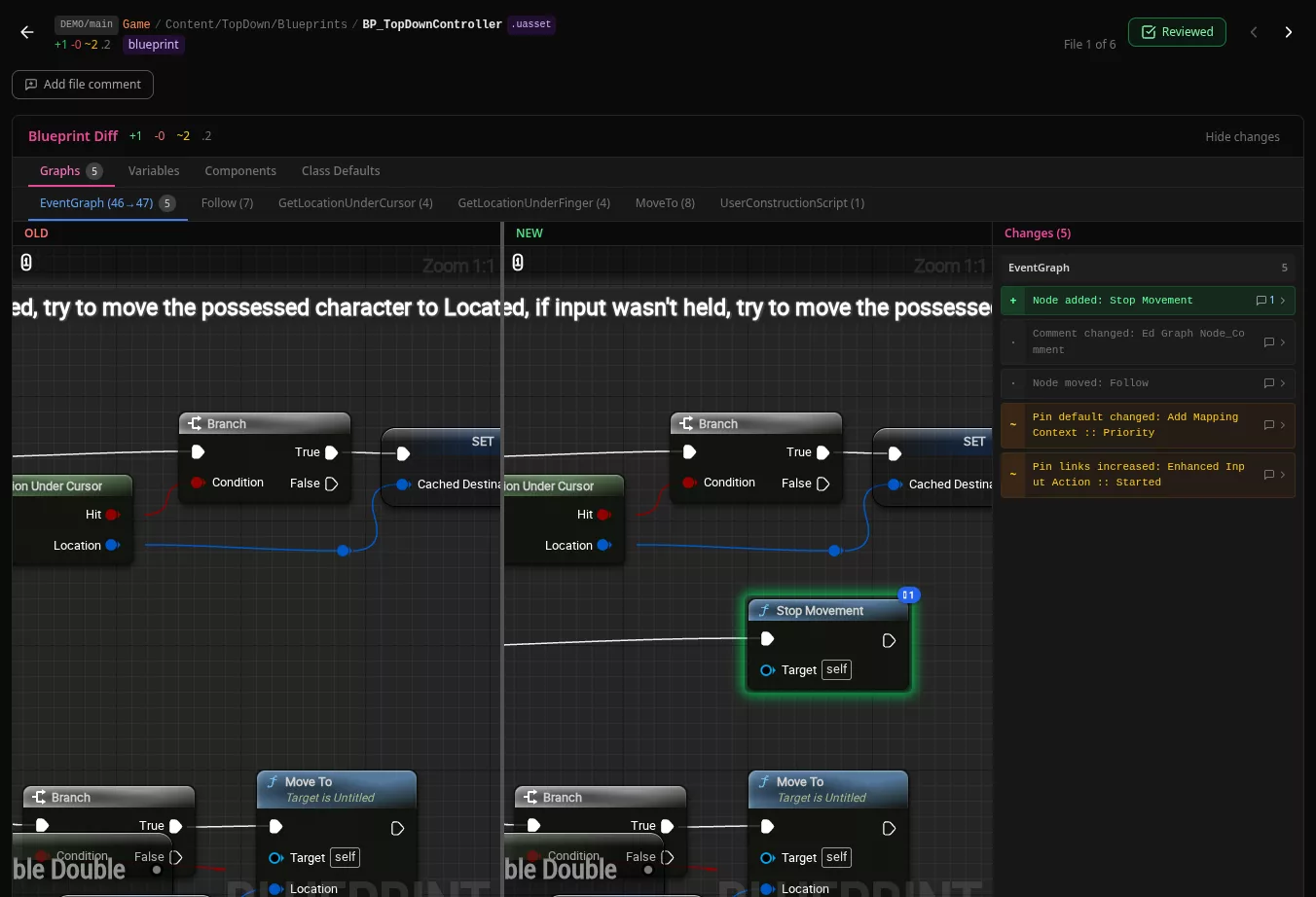
Blueprint diff: the added Stop Movement node highlighted on the new side, with the list of changes
Materials

Material graphs exactly as the editor shows them

The graph is exported by Unreal Engine itself, so every node, colour and preview matches what the artist saw. Texture samples show the actual textures, and the old side shows the old ones.

  • Added, removed, rewired, retuned: a changed constant is listed with the old and new value.
  • Material instances show which parameters were overridden and how.
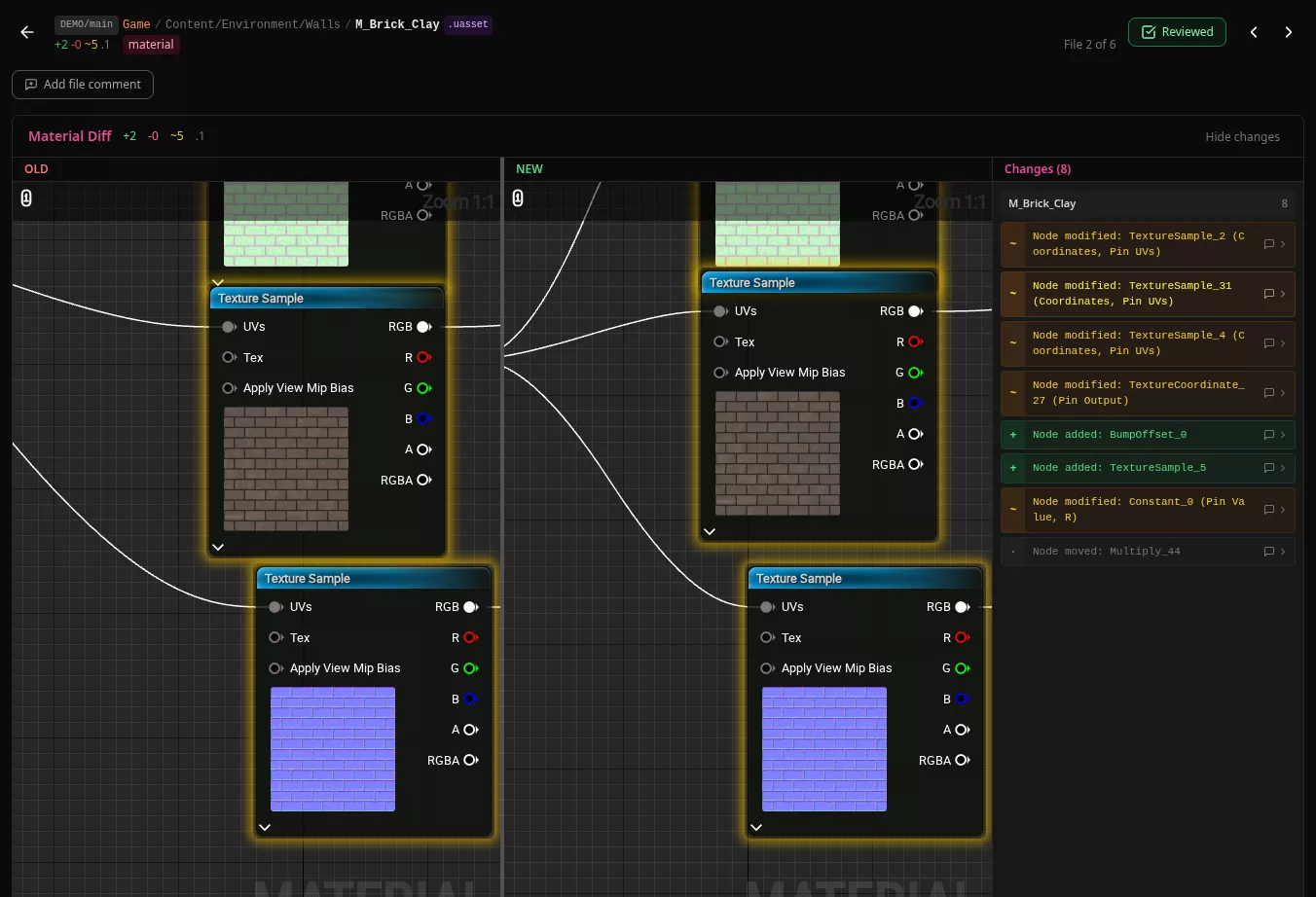
Material diff with texture previews inside the nodes on both sides
3D models

Which part of the model actually moved?

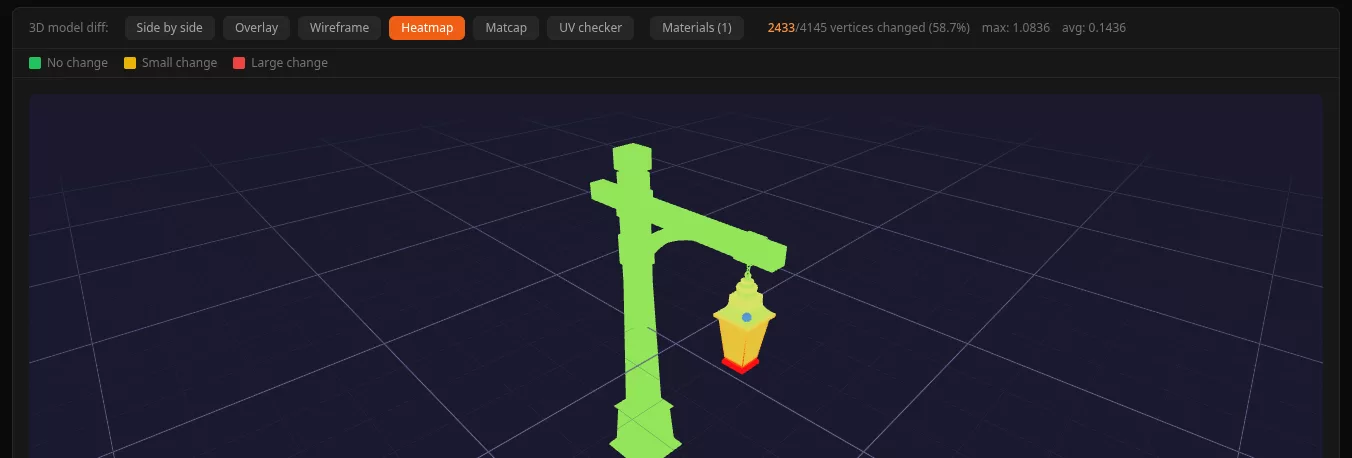
Open a changed mesh and look at both versions together, with textures. Switch to the heat map and the answer is in the colour: green did not move, red did. The post of this lantern is untouched, the lamp housing grew.

  • Six views: side by side with one camera, overlay, heat map, wireframe, UV checker and clay.
  • Pins on the model. Leave a comment on a point of the mesh.
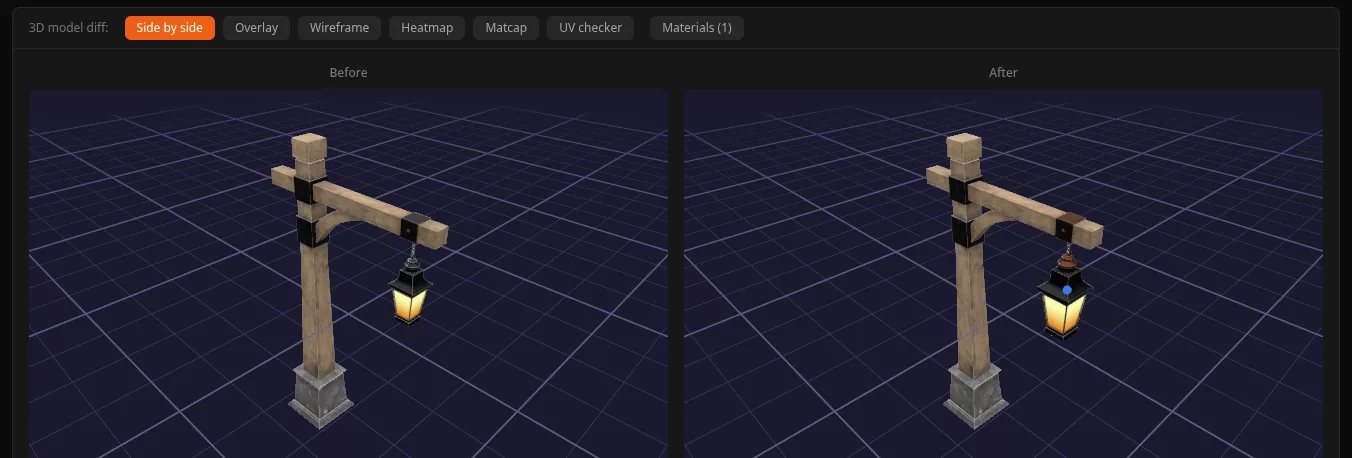
Lantern model before and after, side by side
Heat map of the lantern: green post, red lamp housing
Textures

Spot the patch without squinting

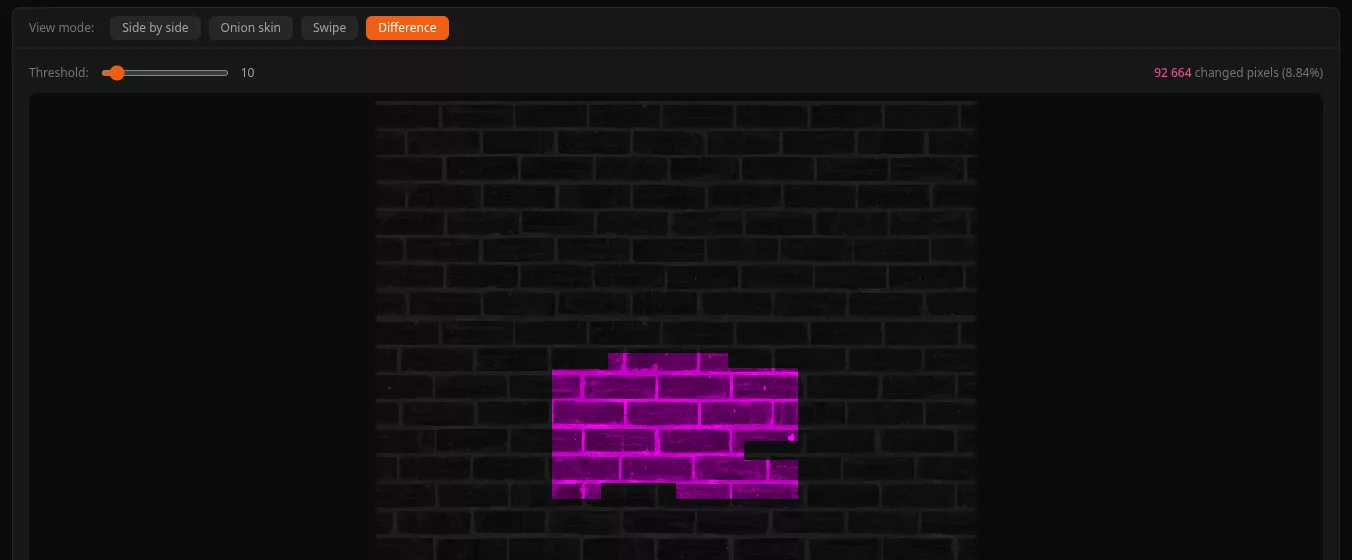
Put the two versions next to each other, swipe between them, fade one over the other, or show only the difference. Touch Review counts the changed pixels, so “9% of the wall was repainted” is a fact on the screen.

  • Draw on it. Circle, arrow or box a spot and attach the comment to it.
  • Export the marked up image as a PNG for the artist.
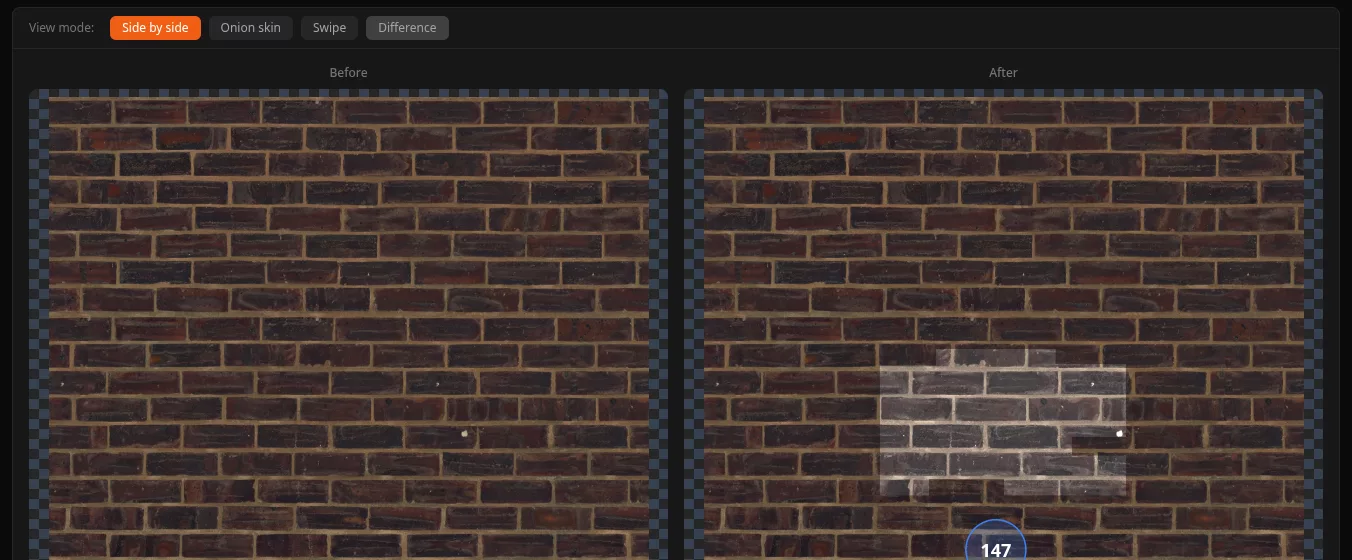
Brick wall texture before and after
Difference mode: only the patched section lights up
Code

And the code review you already know

Side by side or unified diffs with syntax colouring, comments on a line, threads that get resolved. Every comment carries a weight, so the author knows what has to change before approval and what is only a thought.

  • Blocker, suggestion, nit, praise: a blocker stops the approval until it's resolved.
  • Comment templates for the things you write every week.
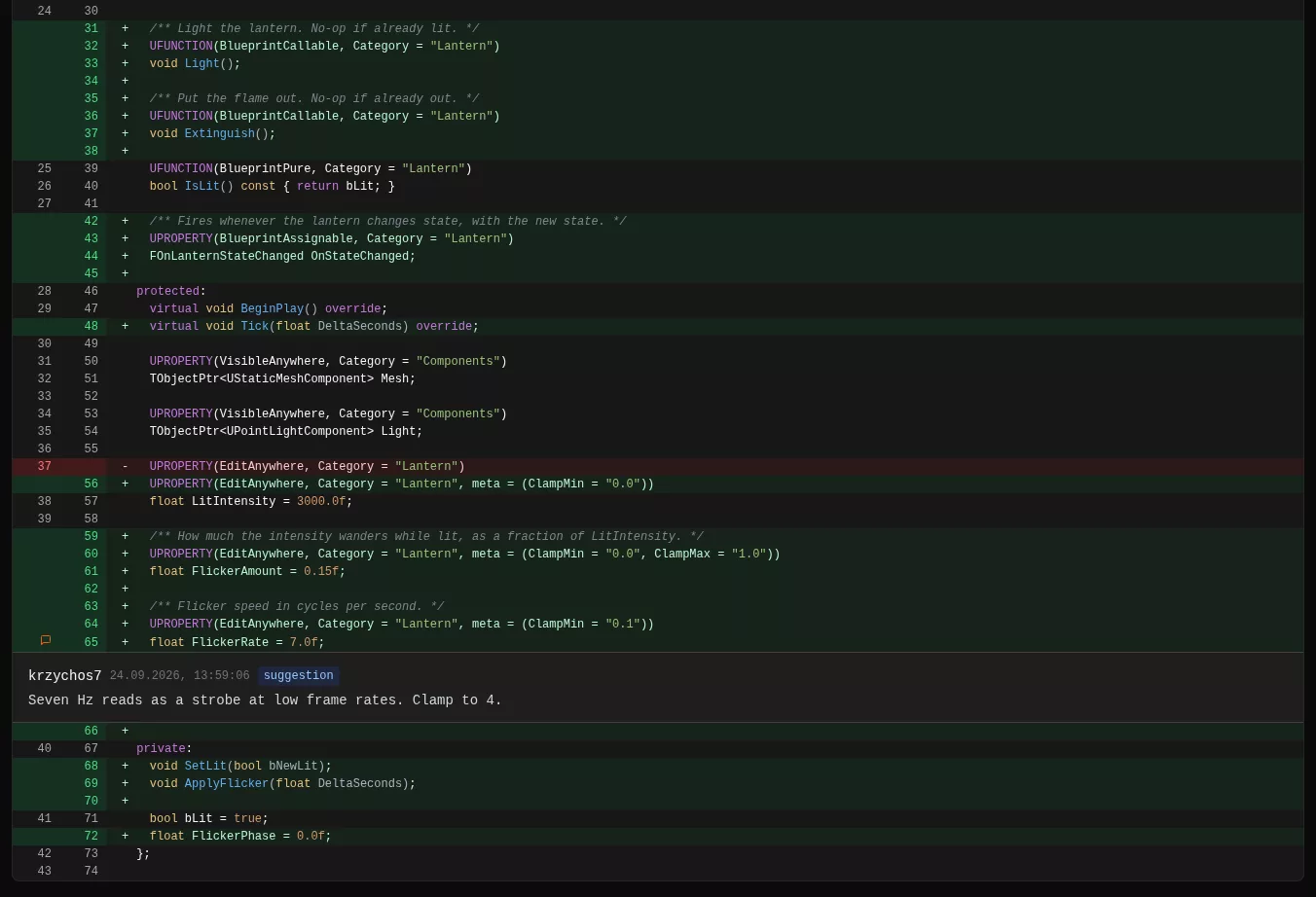
C++ diff with an inline comment marked as a suggestion
What it opens

Every kind of file in a game project

Each type gets a view that fits it. A table is shown as a table, a curve as a curve, a graph as a graph.

ContentWhat you see
C++, shaders, configLine diff with syntax colouring, inline threadsReady
BlueprintsAll graphs side by side, variables, components, class defaultsReady
Materials and instancesThe material graph 1:1 with the editor, texture previews, parametersReady
Static and skeletal meshesSix 3D views with textures, vertex heat map, LODs and materialsReady
Textures and imagesSide by side, swipe, onion skin, pixel difference with a countReady
Data Tables, CurvesA spreadsheet with changed cells marked, the curve drawn over the old oneReady
Animations and montagesTimeline with notifies, sections, slots and sync markersReady
Niagara systemsEmitters switched on or off, user parameters, modulesReady
Input mappingsAction, key, modifiers and triggers as a treeReady
Levels and mapsActors added, removed and moved, shown in the editor viewportWork in progress
Inside Unreal

Review without leaving the editor

Not everyone wants a browser tab. The Touch Review panel docks in the Unreal editor like any other window, with the same reviews, files and comments.

  • Request a review from your changelist. One button, and the right reviewers are picked for you.
  • Open any file in the editor's own diff. Both versions are fetched for you, so the Blueprint diff you know opens on the right revisions.
  • Right click an asset, “View in Touch Review”. Jump from the Content Browser to every review that touched it.
  • Level diff, coming next. Load both versions of a map and see which actors were added, removed or moved, right in the viewport. Work in progress
Features

Everything around the review, built for how studios work

The review itself is half the job. The other half is getting it to the right person, making sure nothing is forgotten, and knowing where the work is stuck.

The right reviewers, automatically

Say who owns which folder: Content/Characters goes to the character team, Source/AI to the AI programmers. New reviews are assigned by path and spread evenly across the team.

Checklists per type of asset

Programmers check tests and performance, artists check LODs, triangle budget and texture size. Each review gets its own list, and it can't be approved with boxes left empty.

Automatic asset checks

Every review runs the rules you set: textures in powers of two and under the size limit, meshes within the triangle budget, names with the right prefix. A failed check shows up before a person even opens the file.

Cherry pick without surprises

Before you move a fix to another stream, Touch Review checks what it depends on. If the Blueprint needs a C++ class that isn't on the target stream yet, you see it in red, with the changelist you have to take along.

“What changed since I last looked?”

When the author updates the change, one button shows only what's new since your last review. Files touched again get a dot, so you don't read the same diff twice.

See where reviews get stuck

Time to approval, reviews waiting longer than a week, who is overloaded and who blocks the pipeline. A dashboard for leads, built from the reviews themselves.

Slack, Teams and Discord

New reviews, comments and votes land in the channel your team already reads, with a link straight to the file.

JIRA and Horde CI

The ticket is linked to the review and its status follows it. The Horde preflight result appears on the review, and a failed build blocks the approval.

Audit trail and policy

Who approved what and when, kept for good and exportable as a PDF. Optionally, Perforce refuses a submit that has no approved review.

An AI first pass, if you want one

An assistant reads the change before your team does and leaves its notes as ordinary comments, marked as such. Switched off by default, and it never approves anything.

Perforce and TouchQuill

Reviews come from Perforce changelists and shelves, streams included, or from TouchQuill. With TouchQuill you also see all three versions of a conflicting asset and follow a function through renames.

On your own server

Touch Review runs on your infrastructure, as a single program or in Docker. Your assets and your code never leave the studio. Sign in with your Perforce account or Google Workspace.

Contact

Closed testing until the end of 2026

Touch Review isn't publicly available yet. Until the end of the year we're running it with a small group of studios. If reviewing art is a pain in your pipeline, write to us. We'll get back to you about joining the test, or just talk about how you review today.

Goes to krzychos7@touch-the-game.com. No mailing lists, no spam.